

If you search for ways to type faster, you’ll probably find advice on typing lessons, keyboard shortcuts, or buying a better keyboard with programmable buttons and features.
Those are all helpful.
But after years of experimenting with different ways to create text, I’ve realised something.
The fastest way to type isn’t always by typing.
Learn the Fundamentals
Like any physical skill, typing improves with practice.
Back in the old days, typing tutors like “Mavis Beacon Teaches Typing” were a popular way to learn touch typing. i even bought a copy myself.
Ironically, i don’t think I ever completed the lessons, and the version became outdated for my windows.
Most of my typing speed came from years of actually using the computer – writing emails, chatting online, building websites, and eventually writing blog articles. Looking back, consistent real-world practice taught me far more than any training program could.
Whether we learn through a typing tutor or by simply creating something every day, the goal is the same: build muscle memory so our fingers spend less time searching for keys and more time keeping up with our thoughts.
Learn Keyboard Shortcuts
Once typing becomes second nature, the next bottleneck isn’t your typing speed.
It’s the number of repetitive actions you perform.
Every time you move your hand from the keyboard to the mouse, click through menus, or repeatedly type the same phrase, you’re introducing unnecessary friction into your workflow.
Learning common keyboard shortcuts like Copy, Paste, Cut, Undo, Redo, Find, and even F2 (For renaming files) may only save a second at a time, but those seconds quickly add up over the course of a day.
Let Your Tools Do the Work
Many productivity improvements aren’t about typing faster.
They’re about typing less.
AutoCorrect, text expansion tools, and macros can automatically replace short abbreviations with full words, sentences, or even entire email templates.
For example, typing a few letters could instantly become your email address, website URL, company name or a frequently used reply.
A few seconds saved on every repetition eventually become hours saved over the course of a year.
Choose Tools That Fit Your Workflow
The best productivity tools aren’t always the newest ones. They’re the ones that help you work with the least friction.
Years ago, I was in love with my Microsoft Digital Media Keyboard 3000 because of its dedicated shortcut keys for launching applications, controlling media, adjusting volume, and zooming. The positioning of those buttons suited the way I worked. When it died, it was already out of production, i couldn’t get a replacement.
The same applies to my favourite mouse, the Logitech G300. Although it’s no longer in production, I still keep a few refurbished ones as backups. What made it special wasn’t flashy specifications, but its practical design. Instead of placing programmable buttons only on one side like many gaming mice today, it has six programmable buttons across the top, making them easily accessible and comfortable for both left- and right-handed users.
Whether it’s a keyboard with dedicated shortcut keys or a mouse with programmable buttons, the principle is the same: reduce the number of repetitive actions we perform every day.
The Fastest Way to Type Is… Not Typing
Everything we’ve discussed so far still assumes one thing:
That you’re typing.
But what if you didn’t have to? 😄
i took a slightly different path.
Around 2010, i experimented with Dragon NaturallySpeaking together with a Blue Yeti USB microphone. At that time, speech recognition required patience, voice training, and decent hardware before it became reliable enough for everyday use.
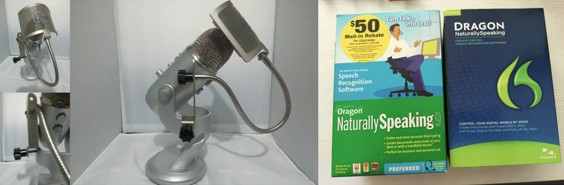
Looking back, i learned that reducing friction is often more valuable than increasing speed.
Fast forward to today, speech-to-text or voice-to-text has improved dramatically. Modern tools require little or no training at all. We simply start talking, and your words appear on the screen with remarkable accuracy.
Unless you can type as fast as you speak, speech-to-text has become one of the fastest ways to create text.
Final Thoughts
For decades, we’ve been searching for ways to type faster.
We learned touch typing.
We memorised keyboard shortcuts.
We created macros.
We programmed shortcut buttons.
Today, many of us simply speak.
The tools have changed and will keep evolving.
The goal hasn’t.
Every generation has tried to reduce the friction between thought and expression.
Typing faster was never the destination.
It was simply one step along the way.
Faster Keyboard Typing Related Post